 Data River
Comm Bank Statement Sample How to Read & Download Yours

By Sandra Vu
Are you looking for a Comm bank statement sample to understand what an official document looks like for your visa, loan, or rental application? Commonwealth Bank of Australia (CommBank) provides clear and standardized bank statements. In this quick guide, we will break down a sample statement and show you exactly how to download your own official copy.
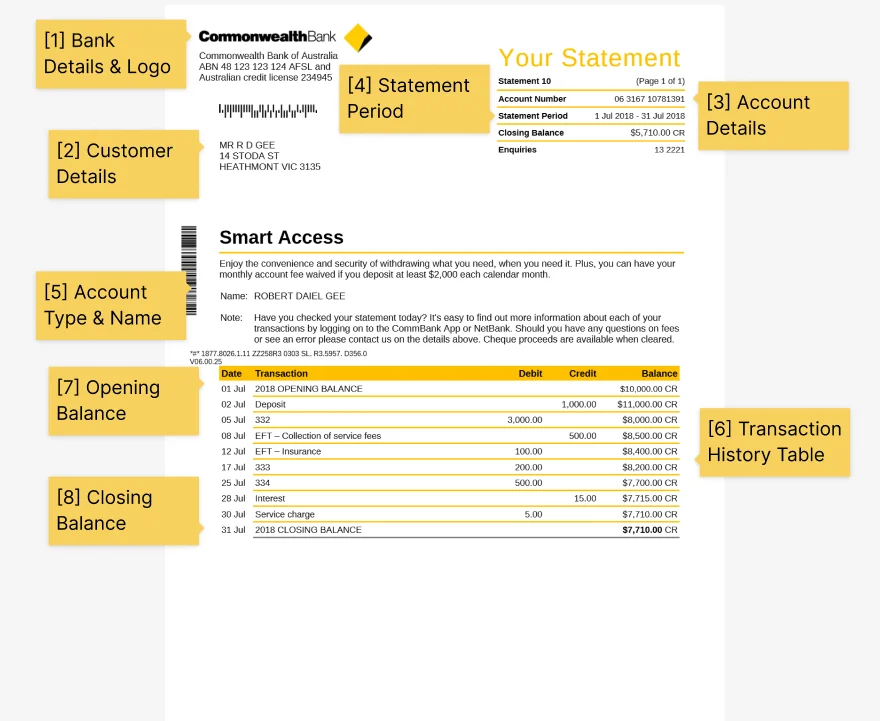
When you download an official statement from CommBank, it will contain several key sections. Here is what you need to check:
-
Customer & Address Details: Located at the top left. This is crucial if you are using the statement as a Proof of Address.
-
BSB and Account Number: Your unique banking details located on the right side.
-
Account Summary: A quick overview showing your Opening Balance, total money in (Credits), total money out (Debits), and your Closing Balance.
-
Transaction Table: A detailed list of all your card payments, transfers, and incoming funds during the statement period.
How to Download Your Official CommBank Statement (PDF)
If you need an official bank statement format, do not use fake statement generators. Always download the official PDF directly from the bank. Here is how:
Via NetBank (Website):
-
Log on to NetBank using your Client Number and Password.
-
Go to the View accounts tab, then select Statements.
-
Choose the account (e.g., Smart Access) from the drop-down menu.
-
Click the download icon next to the statement period you need to save it as a PDF.
Via the CommBank App:
-
Open the CommBank App and tap on your account.
-
Tap Manage, then select Statements.
-
Choose the statement you want and tap the share/download button to save the PDF.
Important Note on Proof of Balance If you only need to prove how much money you have (without showing your full transaction history), you can download a Balance Confirmation letter through NetBank instead of a full statement.
Need the data in a spreadsheet, not just a PDF? Once you've downloaded your official statement, here's how to convert it to a clean CSV for bookkeeping, budgeting, or loan applications — Data River handles the conversion in seconds.

About Sandra Vu
Sandra Vu is the founder of Data River and a financial software engineer with experience building document processing systems for accounting platforms. After spending years helping accountants and bookkeepers at enterprise fintech companies, she built Data River to solve the recurring problem of converting bank statement PDFs to usable data—a task she saw teams struggle with monthly.
Sandra's background in financial software engineering gives her deep insight into how bank statements are structured, why they're difficult to parse programmatically, and what accuracy really means for financial reconciliation. She's particularly focused on the unique challenges of processing statements from different banks, each with their own formatting quirks and layouts.
At Data River, Sandra leads the technical development of AI-powered document processing specifically optimized for financial documents. Her experience spans building parsers for thousands of bank formats, working directly with accounting teams to understand their workflows, and designing systems that prioritize accuracy and data security in financial automation.