 Data River
Best Dext Alternatives in 2026 (And the One Built Just for Bank Statements)
Looking for a Dext alternative? Compare pricing, bank statement extraction speed, and accuracy across Dext, Hubdoc, AutoEntry, Datamolino, and Data River.

Author
Sandra Vu is the founder of Data River and a financial software engineer with experience building document processing systems for accounting platforms. After spending years helping accountants and bookkeepers at enterprise fintech companies, she built Data River to solve the recurring problem of converting bank statement PDFs to usable data—a task she saw teams struggle with monthly.
Sandra's background in financial software engineering gives her deep insight into how bank statements are structured, why they're difficult to parse programmatically, and what accuracy really means for financial reconciliation. She's particularly focused on the unique challenges of processing statements from different banks, each with their own formatting quirks and layouts.
At Data River, Sandra leads the technical development of AI-powered document processing specifically optimized for financial documents. Her experience spans building parsers for thousands of bank formats, working directly with accounting teams to understand their workflows, and designing systems that prioritize accuracy and data security in financial automation.
Looking for a Dext alternative? Compare pricing, bank statement extraction speed, and accuracy across Dext, Hubdoc, AutoEntry, Datamolino, and Data River.

Best business banks in Melbourne for accountants in 2026 — a practical guide to fees, Xero/MYOB integration, and GST tools, matched to client type and cash flow needs.
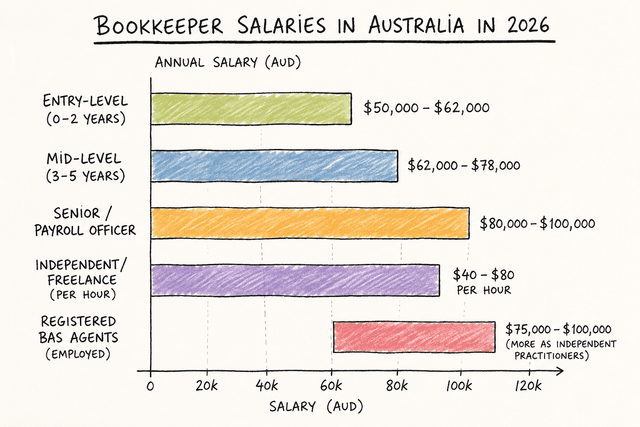
A breakdown of which industries and specialisations pay Australian bookkeepers the most in 2026, from mining and construction to legal trust accounting and SaaS.

A comparison of Macquarie, CBA, NAB, and Westpac for Sydney accountants, covering software integration, fees, and account permissions.
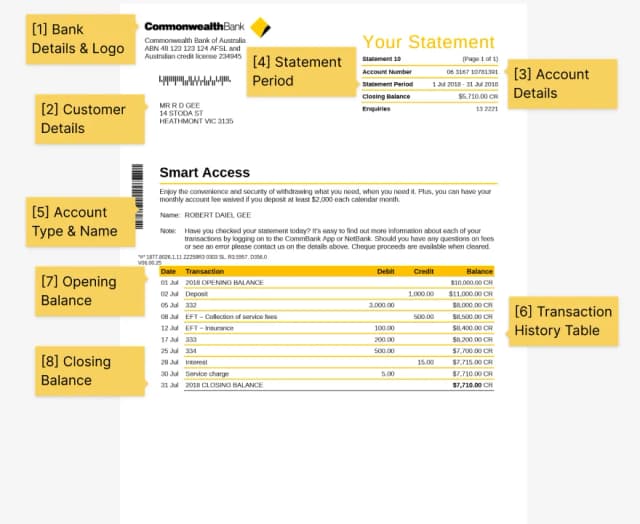
Confused by your CommBank statement? This sample breaks down each section and shows you exactly how to download the official PDF via NetBank or app.
Comprehensive guide to converting bank statements from Chase, Bank of America, Wells Fargo, Citi, and 8,000+ other banks to Excel, CSV, and accounting formats.
Complete guide to bank statement file formats—PDF, CSV, Excel, QBO, OFX, QFX. Learn which format to use for QuickBooks, Xero, Excel, and when to convert between formats.
Step-by-step guide to importing bank statements into QuickBooks Online, Xero, Zoho Sheet, and other accounting software. Compare CSV, QBO, OFX formats.
Step-by-step guide to converting Capital One bank statement PDFs to Excel spreadsheets for budgeting, accounting, and financial analysis.
Step-by-step guide to converting Citibank statement PDFs to Excel spreadsheets for budgeting, accounting, and financial tracking.
Complete guide to converting Discover Card and American Express (Amex) PDF statements to Excel or CSV, including cashback tracking, rewards points, and expense categorization.
Complete guide to converting HSBC UK, HSBC USA, and international HSBC bank PDF statements to Excel or CSV format. HSBC no longer offers CSV export, making PDF conversion essential.
Complete guide to converting PNC Financial Services PDF statements to Excel, CSV, or QuickBooks format. PNC doesn't offer CSV export, making PDF conversion the only solution.
Complete guide to converting TD Bank and TD Canada Trust PDF statements to Excel, CSV, or QuickBooks format, including workarounds for the 18-month CSV download limit.
Complete guide to converting Truist Bank PDF statements to Excel, CSV, or QuickBooks format, including workarounds for the 2025 CSV format change and legacy BB&T/SunTrust statements.
Step-by-step guide to converting U.S. Bank statement PDFs to Excel spreadsheets for budgeting, accounting, and financial management.
Step-by-step guide to importing PDF bank statements into Xero accounting software using CSV, OFX, and bank feeds for automated reconciliation.
How small business owners can use bank statement converters to streamline bookkeeping, prepare for taxes, and manage cash flow more effectively.
Understand the different bank statement file formats including PDF, CSV, OFX, and QBO, and when to use each for accounting and analysis.
Learn how to protect sensitive financial data when converting, storing, and sharing bank statements for accounting and analysis purposes.
Learn about common errors when converting PDF bank statements to Excel and how to identify and fix them for accurate financial data.
Learn how professional bookkeepers use automation tools to streamline bank reconciliation, reduce errors, and save hours of manual work.
Learn how to set up automated workflows for processing bank statements monthly, saving time on reconciliation, bookkeeping, and financial reporting.
Learn methods to automatically categorize bank transactions after converting statements to Excel, using rules, formulas, and smart matching.
Complete guide to converting Bank of America PDF statements to CSV format for Excel, Google Sheets, and accounting software import.
Learn how to prepare and convert bank statements for mortgage, business loan, and personal loan applications with proper formatting.
Step-by-step guide to converting Chase bank statement PDFs to Excel spreadsheets for budgeting, accounting, and financial analysis.
Learn how to convert credit card statement PDFs to Excel or Google Sheets for expense tracking, budgeting, and tax preparation.
Step-by-step guide to converting Navy Federal Credit Union PDF statements to Excel or CSV format for budgeting and financial tracking.
Complete guide to converting Wells Fargo PDF bank statements to Excel or CSV format for budgeting, bookkeeping, and financial analysis.
Learn techniques for converting and processing multi-page PDF bank statements while maintaining data integrity across page breaks.
Learn how to combine multiple bank statements from different accounts and months into a single spreadsheet for comprehensive financial analysis.
Understand why PDF bank statements are difficult to analyze, edit, and import into accounting software, and how to solve these challenges.
Compare automated bank statement converters against manual data entry for speed, accuracy, cost, and efficiency in accounting workflows.
Compare free and paid bank statement converters. Understand the trade-offs in accuracy, features, security, and when to upgrade from free tools.
Learn efficient workflows accountants use to process multiple client bank statements, from conversion to reconciliation and reporting.
Step-by-step guide to converting PDF bank statements to Excel spreadsheets using online converters, manual methods, and automated tools.
Learn how to convert scanned or image-based bank statements to CSV format using OCR technology for accounting and data analysis.
Complete guide to extracting transaction data from PDF bank statements for accounting, analysis, and reconciliation.
Step-by-step guide to importing PDF bank statements into QuickBooks Online and Desktop using CSV, QBO, and direct bank feeds.
Complete guide to organizing and preparing bank statements for financial audits, including documentation requirements and best practices.
Step-by-step guide to reconciling bank statements in Excel, including formulas, templates, and best practices for accurate account reconciliation.
Compare traditional OCR and AI-powered document processing for bank statements. Understand accuracy, speed, and use cases for each approach.
By the end of 2025, over 1.2 trillion document pages will be scanned globally. Yet most organizations still struggle with turning those scans into usable data.
Understand bank statement parsing - the process of extracting and structuring transaction data from bank statements for accounting and financial analysis.
Learn how OCR (Optical Character Recognition) technology extracts text and data from PDF and scanned bank statements for accounting and analysis.
Learn how transaction categorization automatically sorts bank transactions into expense categories for budgeting, accounting, and financial reporting.
A bank statement converter transforms PDF bank statements into structured Excel-ready data. Learn how AI-based converters work and why privacy matters.
Deep dive into how bank statement converters work, including the AI technology, parsing challenges, and methods to convert PDF bank statements to Excel or CSV format.
Managing your finances becomes much easier when your bank statements are in a CSV file. Learn how to convert PDF bank statements to CSV online.
Managing your finances is easier when your bank statements are in Google Sheets. Learn how to convert PDF bank statements to Google Sheets-compatible CSV files.
Managing your finances is easier when your bank statements are in Zoho Sheet. Learn how to convert PDF bank statements to Zoho Sheet-compatible CSV files.
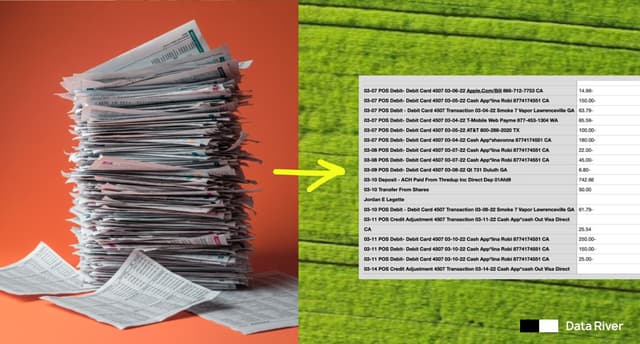
By the end of 2025, over 1.2 trillion document pages will be scanned globally. Yet most organizations still struggle with turning those scans into usable data.